Weekly project status reports and daily team digest
Weekly project status reports and daily team digest
One status per project per week: health, what moved, what is next, what is blocked. Plus a morning digest in team chat with who is absent, overbooked or free.
The problem
Status reporting in an agency fails in one of two ways. Either it is a weekly meeting where eight project managers read their notes aloud to each other for an hour, or it is a document nobody updates after the second week. In both cases the person who needs the information, the owner deciding whether to hire or the account manager about to call the client, does not have it on the day they need it.
Capacity has the same reporting problem on a daily scale. A vacation that collides with a release, a developer booked on two projects, a designer with nothing to do: all of it is visible in the plan, if somebody opens the plan. On a busy morning, nobody does.
How it works in PepperPlanner
Weekly Status is one page with one row per project. Each row carries a health colour and three short fields: what was done this week, what the plan is for next week, and what is blocked. The whole team’s week fits on one screen, and it is readable on a phone before a Monday meeting.
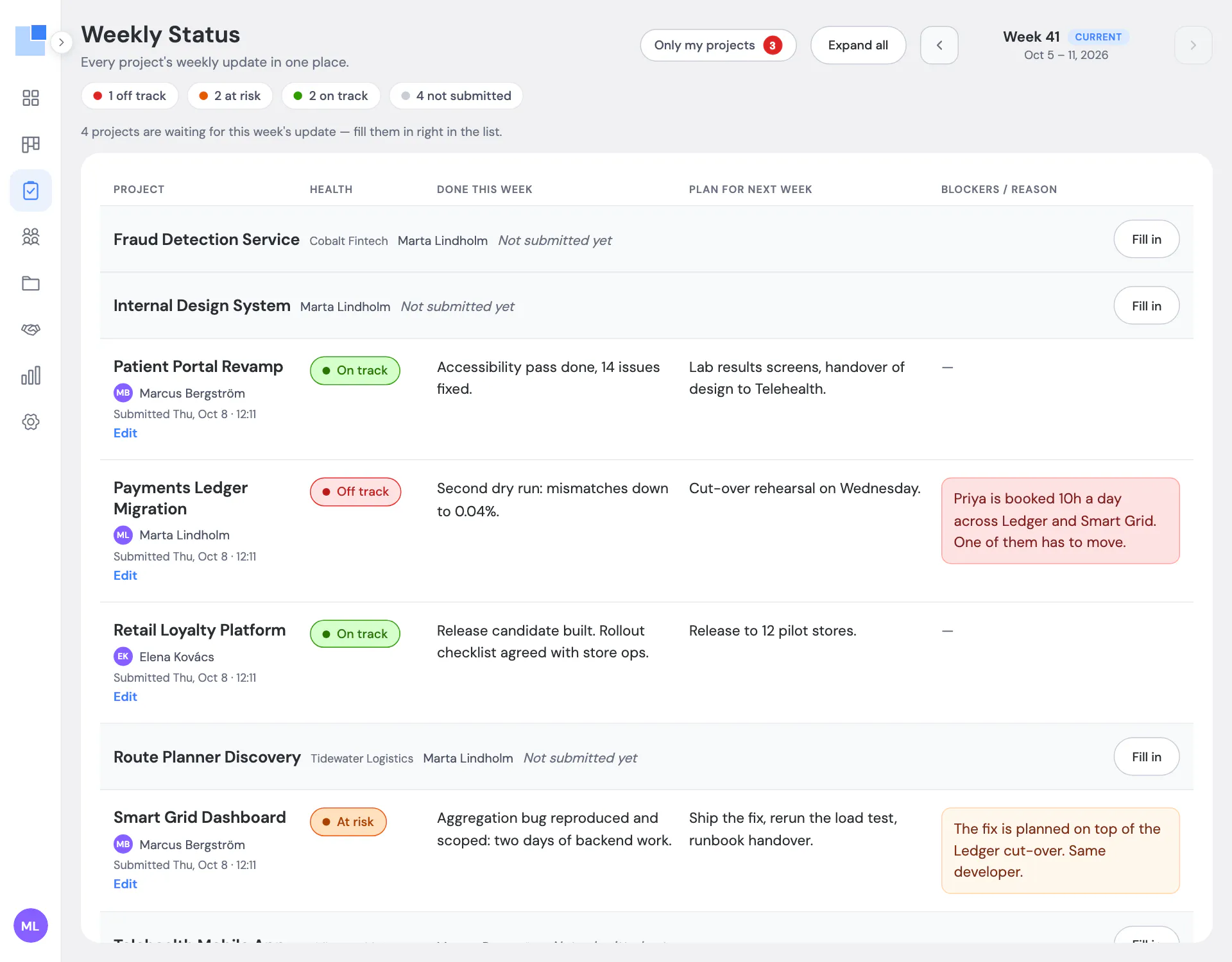
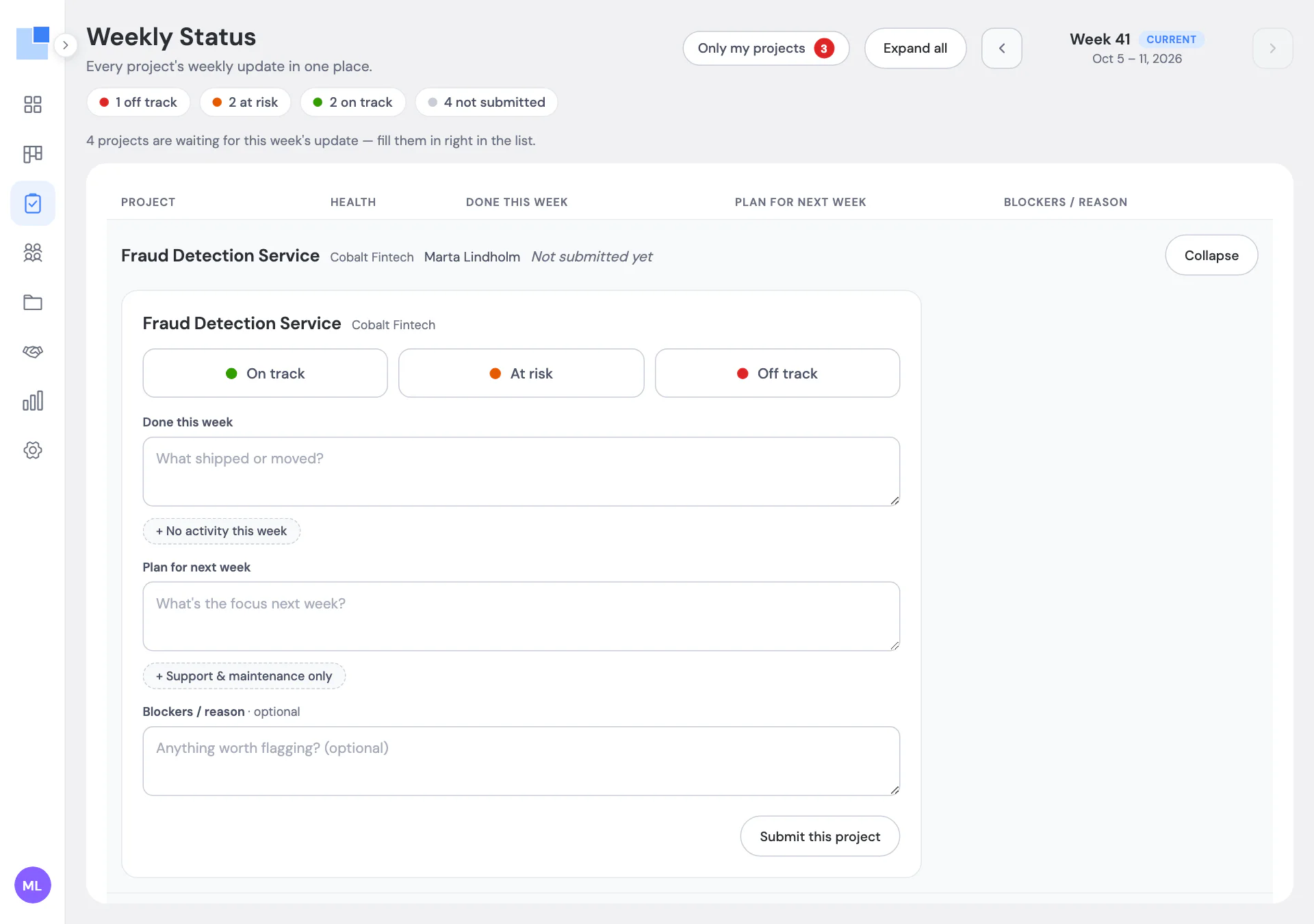
Filling it in takes a project manager about three minutes per project, and that is deliberate. Three fields, a colour, submit. Blockers are required unless the project is green, so a yellow status always comes with a reason. Drafts stay private until submitted. Submitted updates can be edited, and the edit is recorded with who and when, so a status that changed on Thursday is not mistaken for the Monday one.
The page keeps history, one week back at a time, and the latest health shows next to each project in the project list, so “which projects are red” is visible without opening the page at all.
The daily digest is the capacity side of the same idea. Every morning PepperPlanner posts a short message to a channel in your team chat: who is absent today, who is overbooked this week, who has room, and any absence that collides with planned work. Only exceptions are listed, five per section at most, each name linking to that person’s week on the Schedule. On Monday the message covers the week ahead. On a quiet day it is one line saying all clear. This is the digest for a demo workspace, exactly as it was generated, minus the links:
Week ahead · 12–18 Oct

🌴 Absent this week · 1
- Ava Sullivan — vacation 12–16 Oct, back Mon 19 Oct

🔥 Overbooked this week · 1
- Priya Nair — 50h of 40h

🟢 Available this week · 1
- Omar Haddad — 40h free this week
The digest goes to Mattermost today, through an incoming webhook that an admin pastes into Settings. Slack and email are on the list and not there yet.
Neither of these replaces a project management tool. There are no tasks here, no tickets, no burndown. The status is the summary a PM would write in chat anyway, kept where everyone can find it a month later; the digest is the plan reading itself out loud so nobody has to remember to open it. A per-project weekly status written by the PM, kept next to the capacity plan, is not something we found on the public product pages of Float or Resource Guru, the two planners we trialled before building our own (checked 8 October 2026). Both have deeper reporting than we do; this is the piece we needed and they did not have.
Questions we get about this
Who fills in the status?
The project manager assigned to the project. The page shows which of their projects are still waiting for this week's update, and 'Only my projects' narrows the list to them. Anyone with access can read all of them.
What exactly is in a status?
A health colour (on track, at risk, off track) and three short text fields: done this week, plan for next week, blockers. Blockers are required when the project is not green. Drafts are private until submitted; submitted updates can be edited with an audit trail.
Where does the daily digest go?
To a channel in your team chat through an incoming webhook. Mattermost is supported today; Slack and email are not yet. It is set up by a workspace admin in Settings.
What does the digest contain?
Only exceptions: who is absent, who is overbooked, who has more than half their week free, and absences that collide with planned work. On a day with nothing to report it says so in one line. Monday's message covers the week ahead.
Is weekly status included in every plan?
It is listed in both plans and is currently enabled per workspace on request, while we finish the self-serve switch. Ask and we turn it on the same day.
From the blog
-
Why we built our own resource planner instead of buying one
A 20-person software agency, one long Google Sheet, and three planning questions it could not answer. How PepperPlanner started and what it fixes.
Other features
-
Resource scheduling for agencies
Hourly allocations on one timeline, by person or by project, with totals that turn red when someone is over.
-
Capacity planning dashboard with overbooking alerts
Utilization, free hours, and who is over or under, for this week, next week or the month, with live alerts.
-
Utilization reports for agencies
Utilization per person, planned hours and cost per project, conflicts, bench and time off, exportable to Excel.
PepperPlanner is the planner we built for our own 20-person agency. Free for 5 people, €3 per user after that.
Get started free All features