Why we built our own resource planner instead of buying one
A 20-person software agency, one long Google Sheet, and three planning questions it could not answer. How PepperPlanner started and what it fixes.
Peppernode is a software agency of about 20 people. We build products for clients in Europe and the US, several projects at a time, and the whole staffing plan used to live in one long Google Sheet.
The sheet was fine while one person could keep the plan in their head. Somewhere on the way to 20 people that stopped being true, and we started finding out about staffing problems from the people who were already in them.
What the spreadsheet could not tell us
A staffing sheet is easy to write to and hard to read. One tab per person, updated weekly at best, and nothing in it adds itself up. We kept getting stuck on the same three questions.
Is anyone double-booked? In a sheet, an overbooking is two cells that each look fine. A backend developer has 6 hours a day on one project and 4 on another, and nobody sums the row until the week has started. The sneakier version is three small slices: 4 hours here, 4 there, and “just 2 hours of QA” on a third project.
Who is free in three weeks? A sales call ends with “can you start in November?” The honest answer needs a list of who rolls off which project and when. In the sheet that meant scrolling sideways and reading cell colours.
What does this vacation break? The vacation is in one calendar, the project work is in the sheet, the release date is in Jira. The collision is visible in none of them.
Jira never helped here, and it is not supposed to. It knows about tasks. It does not know that a person has 8 hours in a day. We still run Jira for tasks. We stopped expecting it to tell us who is free next week.
We tried to buy one first
Before writing any code we trialled Float, Resource Guru and Runn. They are good products. Float still does more than we do on integrations and reporting depth.
None of them was quite right for us, and most were priced like enterprise software for a 200-person consultancy. We wanted three things on one screen: people, projects, and hours per day.
So we did what agencies do with developers who are between projects and gave them an internal product. PepperPlanner was built in bench time, by the same people it now schedules.
The first screen is still the main screen
People down the side, days across the top, a bar for every allocation. We started by planning whole days and moved to hours per day once it was obvious that developers and QA are rarely on one project from morning to evening.
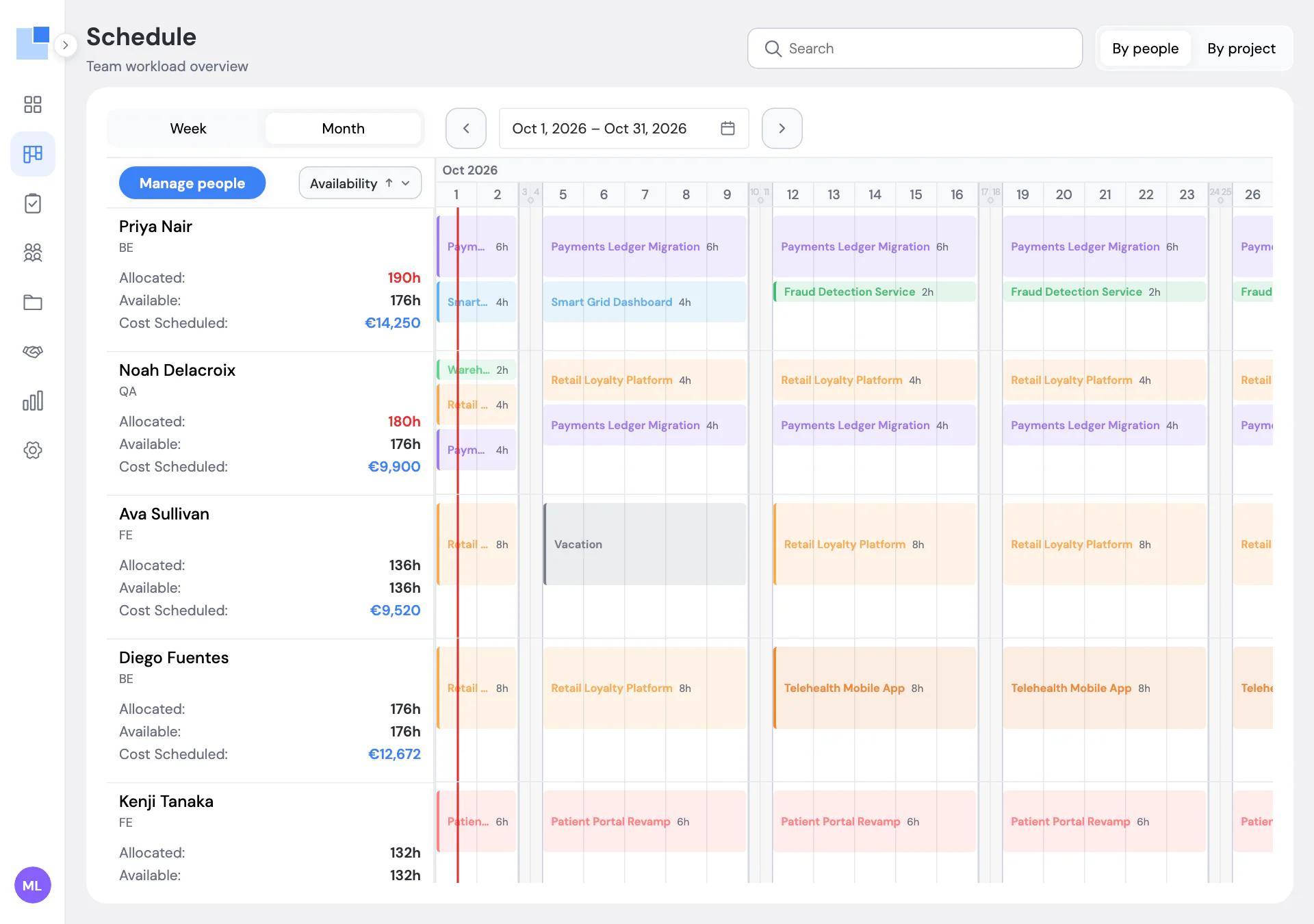
Allocated hours turn red the moment they pass what a person has. Vacations and public holidays take hours out of capacity on their own, so a week off stops looking like a free week.
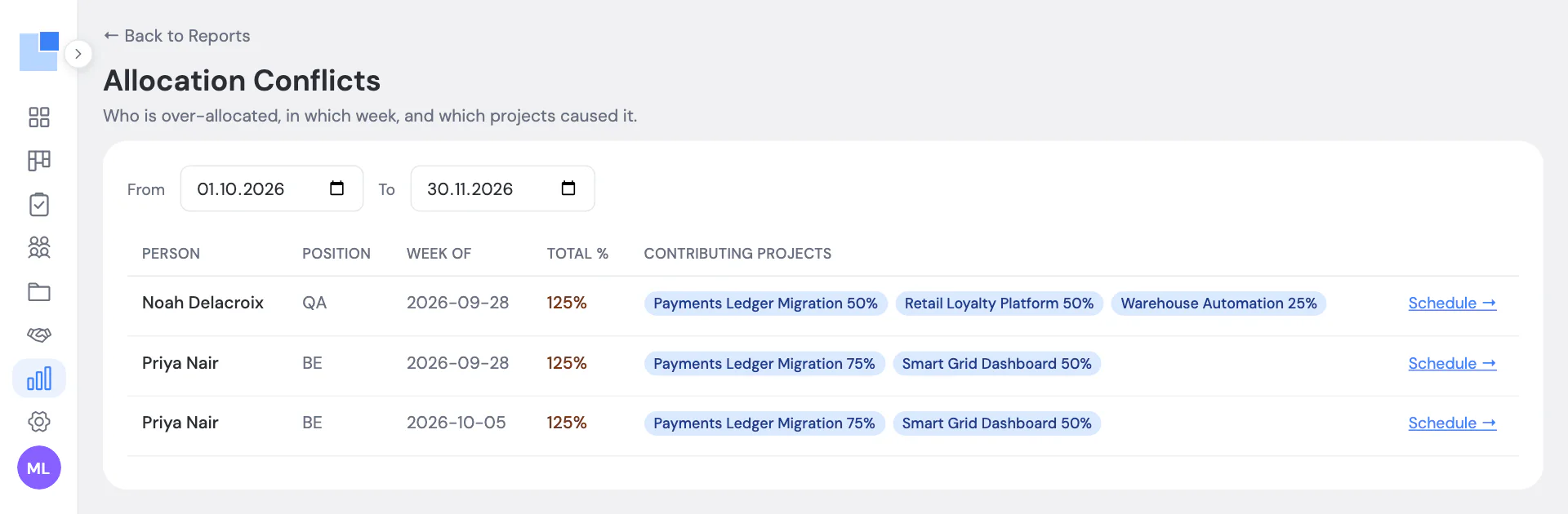
The double-booking question got its own report. It lists each over-allocated person, the week, and the projects that add up to the problem.
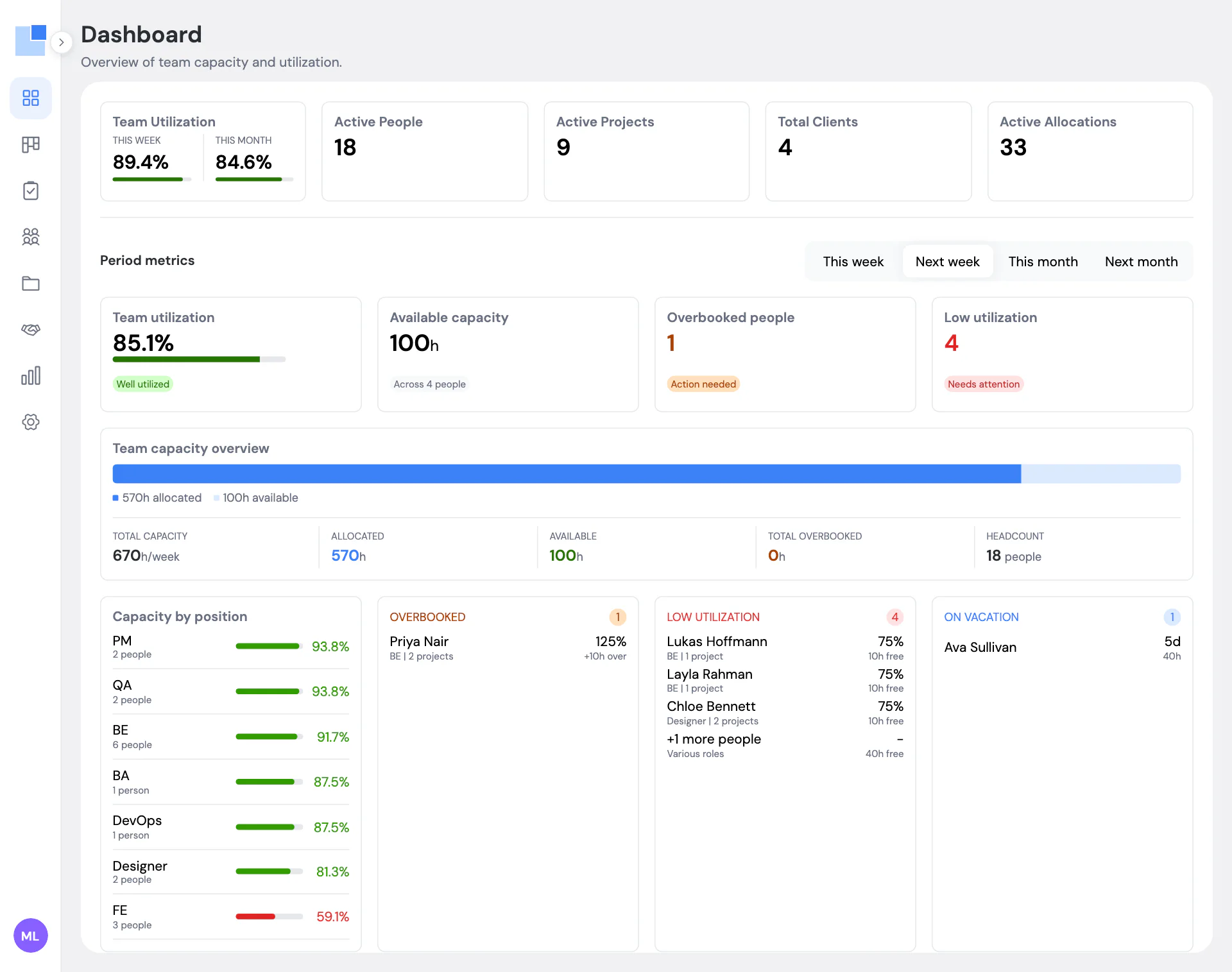
“Who is free” became the dashboard. The tab worth opening is “Next week”, because next week can still be changed.
The newest piece is a short morning message in our Mattermost channel: who is absent, who is overbooked, who has room. It reports exceptions only. On a good day it says so in one line.
We have planned Peppernode in it for two years now.
The price
€3 per user per month, and free for up to 5 people and 3 projects. For our own 20 people that is €60 a month.
We are an agency, so we priced it the way we wanted to pay when we were the ones shopping. At that price nobody has to hold a meeting about whether to buy it.
What it does not do
There is no time tracking. PepperPlanner shows what was planned, not what was logged, so it cannot tell you a project burned 68% of its budget. It can tell you what the plan will cost.
It is not a project manager. No tasks, no boards, no tickets. We think a planner that tries to replace Jira ends up worse at both jobs.
The daily digest goes to Mattermost only. Slack and email are not there yet. And everyone is assumed to work Monday to Friday.
What ships next shows up in the changelog. If your plan still lives in a sheet and the three questions above sounded familiar, the feature list is a two-minute read.