Resource scheduling for agencies
Resource scheduling for agencies
Plan who works on what, by the hour, on one timeline. Drag-and-drop allocations, split days, vacations that reduce capacity, by person or by project.
The problem
A staffing plan in a spreadsheet is easy to write to and hard to read. One tab per person, a column per week, a cell that says “Loyalty 50%”. Nothing in it adds up on its own, so the two questions that matter most, who is over and who is free, need a person to scroll sideways and sum cells in their head. By the time the answer is wrong, the week has started.
The second problem is granularity. Whole days are too coarse for a developer who spends the morning on one client and the afternoon on another, and a sheet that tracks hours per person per day per project is a sheet nobody updates.
How it works in PepperPlanner
The Schedule is a timeline: people down the side, days across the top, a coloured bar for every allocation. An allocation is a project, a date range and hours per day. Click an empty cell to add one, drag a bar to move it, pull its edge to extend it, or split it where a person switches projects mid-week.
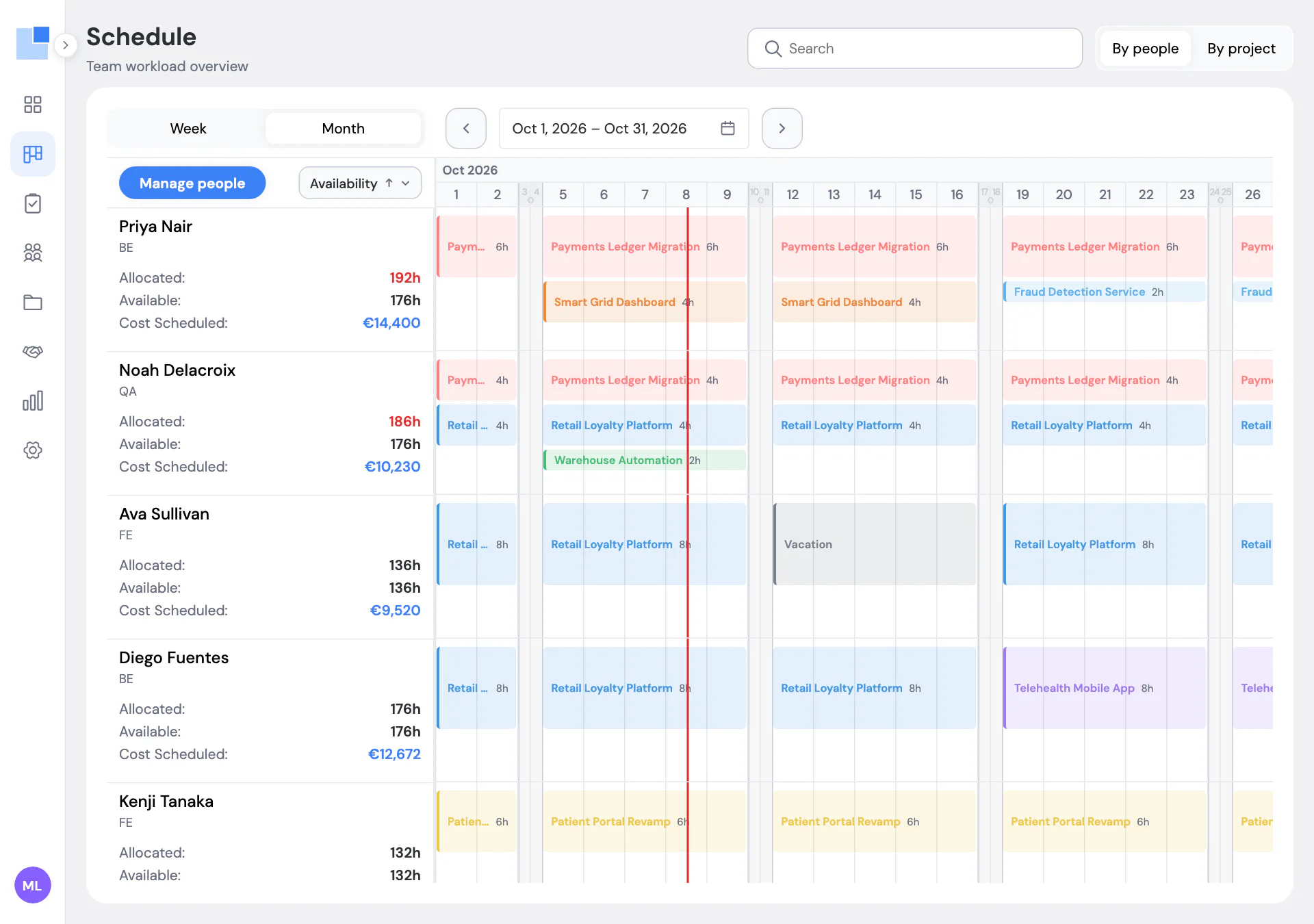
Every row shows allocated hours against available hours for the visible period. Available is the person’s daily hours times working days, minus vacation and public holidays. Allocated is the sum of their bars. When allocated passes available, the number turns red. That one rule replaces the mental arithmetic of the spreadsheet.
Hours per day are the unit. A backend developer can have 6 hours on a migration and 2 hours on a presale estimate in the same week; the bars stack and the total still adds up. A project manager can simply have 4 hours on each of two projects, every day, for three months.
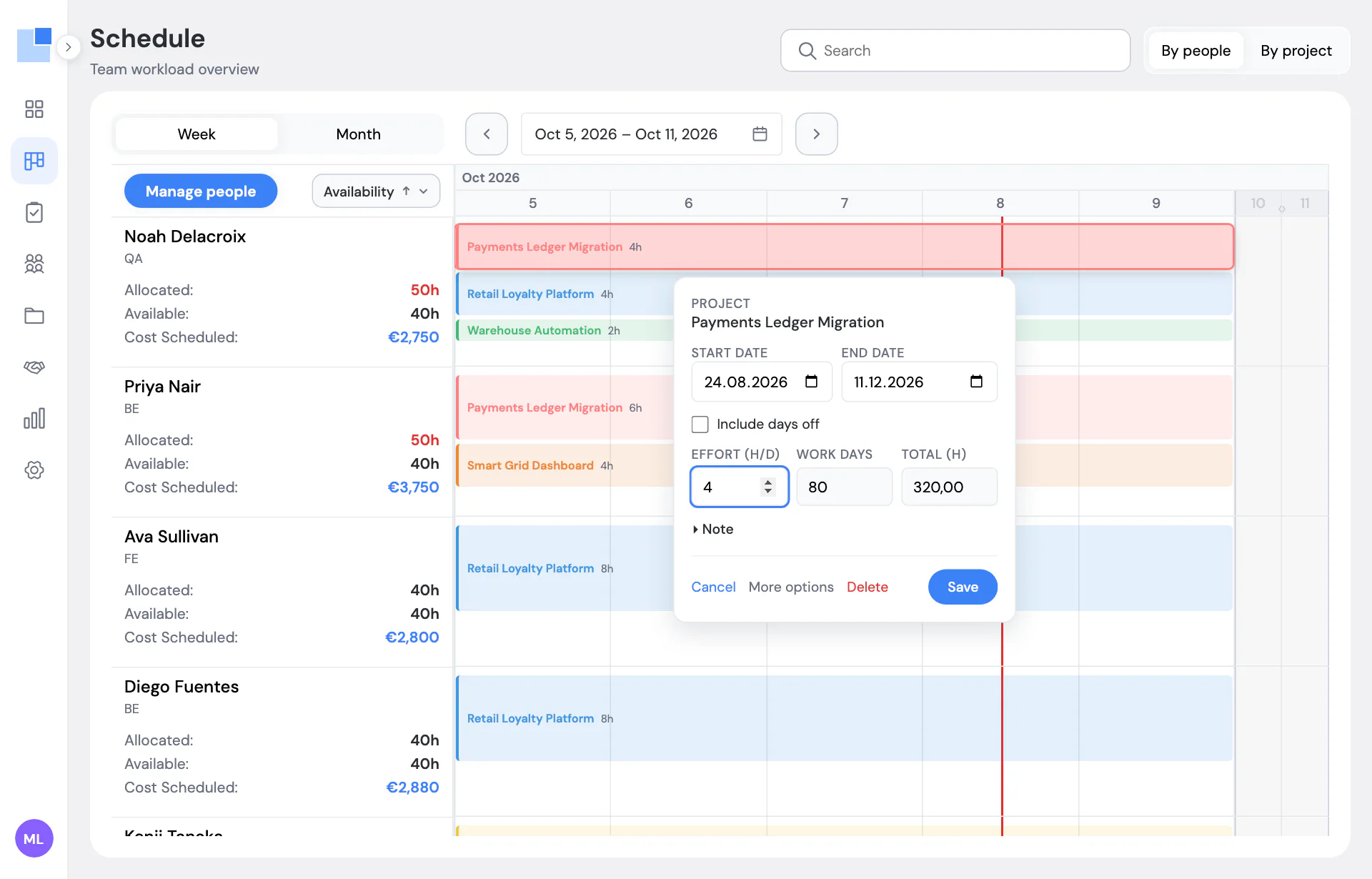
Vacation is an allocation too, with no project. It takes hours out of capacity, so a week off never looks like a free week, and anything planned on top of it shows up as a conflict. Public holidays are set once per workspace and apply to everyone.
The people and projects behind the bars are plain lists, not a setup project. A person has a name, a position, daily hours and, if you want cost and revenue in reports, a cost rate and a billable rate. A project has a client, a stage (presale, confirmed, active, paused, closed, or your own) and a budget. Positions and clients can be created from inside the form you are already in, so adding a new hire or a new client is one step, not three.
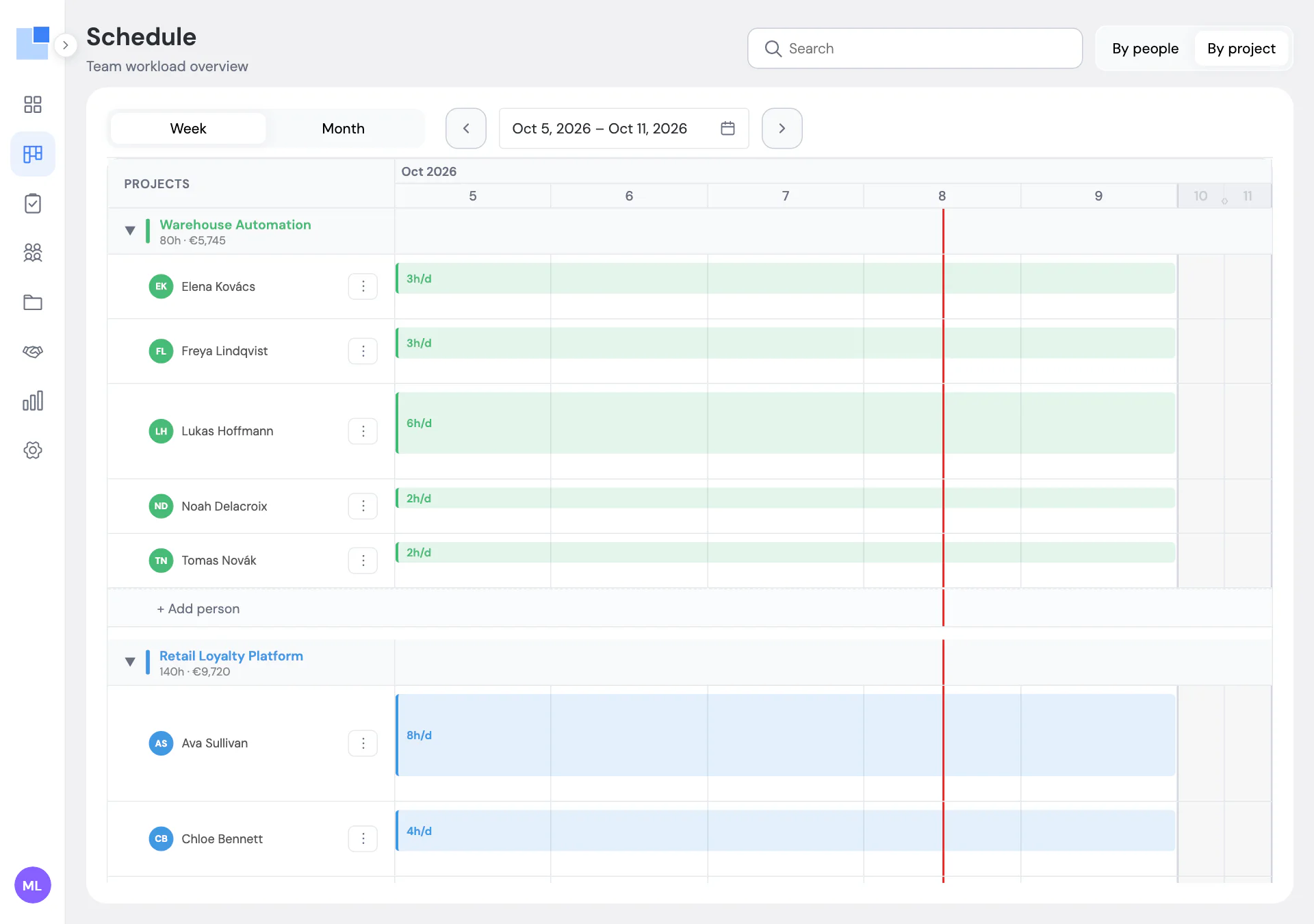
Switch to “By project” and the same data regroups: each project with its people and their hours per day, plus the total hours and planned cost for the period. That is the view a project manager opens before a client call. Week and month zoom, sorting by name or by availability, and collapsed weekends are remembered per device.
Everything here is the plan, not timesheets. PepperPlanner does not track hours worked; it tells you what is booked and what is free. We use Jira for tasks and the Schedule for people, and we stopped trying to make one tool do both.
Questions we get about this
Can one person be on two projects in the same day?
Yes. An allocation has hours per day, so 4 hours on one project and 4 on another is normal. If the total goes over the person's daily hours, their weekly total turns red and the dashboard lists them as overbooked.
Do vacations and public holidays change the plan?
They reduce capacity. A week of vacation takes 40 hours out of that person's available total, and public holidays set in Settings do the same for everyone. Project work is not planned on those days unless you tick 'include days off' on the allocation.
Can I plan by day instead of by hour?
Plan 8 hours a day and it is a full-day plan. We started that way and moved to hours when it became clear that developers and QA rarely spend a whole day on one project. Project managers usually stay at whole days.
How do I set up people, positions, projects and clients?
People have a position (PM, Developer, QA, Designer, or your own), daily hours and optional cost and billable rates. Projects belong to a client, have a stage and a budget. You can create a position or a client right from the form you are in.
Can I see the plan for one project only?
Switch to 'By project'. Each project becomes a group with its people and their hours per day, plus the total hours and cost for the visible period. You can add a person to a project from there.
From the blog
-
Why we built our own resource planner instead of buying one
A 20-person software agency, one long Google Sheet, and three planning questions it could not answer. How PepperPlanner started and what it fixes.
Other features
-
Capacity planning dashboard with overbooking alerts
Utilization, free hours, and who is over or under, for this week, next week or the month, with live alerts.
-
Utilization reports for agencies
Utilization per person, planned hours and cost per project, conflicts, bench and time off, exportable to Excel.
-
Weekly project status reports and daily team digest
A three-minute weekly status per project, all on one page, and a morning digest of exceptions in your team chat.
PepperPlanner is the planner we built for our own 20-person agency. Free for 5 people, €3 per user after that.
Get started free All features